US Q4 TAX0d 00h 00m 00suntil estimated tax is due, 15 Jan 2027[1]UK SELF ASSESSMENT0d 00h 00m 00suntil the online return is due, 31 Jan 2027[2]AU BAS Q10d 00h 00m 00suntil July to September BAS is due, 28 Oct 2026[3]AU TAX RETURN0d 00h 00m 00suntil self-lodged returns are due, 2 Nov 2026[4]UK LATE FILING£100fine the day after the Self Assessment deadline, then £10 a day after 3 months (up to £900)[5]UK 6 MONTHS LATE£300 or 5% of tax dueextra fine, whichever is greater[5]US FAILURE TO FILE5% a month, max 25%of unpaid tax for each month a return is late[6]US 60+ DAYS LATE$525 or 100% of tax dueminimum penalty, whichever is less (returns due after 31 Dec 2025)[6]AU LATE LODGE$364▲ from $330per 28 days late, up to $1,820, for individuals and small businesses[7]
US Q4 TAX0d 00h 00m 00suntil estimated tax is due, 15 Jan 2027[1]UK SELF ASSESSMENT0d 00h 00m 00suntil the online return is due, 31 Jan 2027[2]AU BAS Q10d 00h 00m 00suntil July to September BAS is due, 28 Oct 2026[3]AU TAX RETURN0d 00h 00m 00suntil self-lodged returns are due, 2 Nov 2026[4]UK LATE FILING£100fine the day after the Self Assessment deadline, then £10 a day after 3 months (up to £900)[5]UK 6 MONTHS LATE£300 or 5% of tax dueextra fine, whichever is greater[5]US FAILURE TO FILE5% a month, max 25%of unpaid tax for each month a return is late[6]US 60+ DAYS LATE$525 or 100% of tax dueminimum penalty, whichever is less (returns due after 31 Dec 2025)[6]AU LATE LODGE$364▲ from $330per 28 days late, up to $1,820, for individuals and small businesses[7]
Tax deadlines are coming in the US, UK and Australia
We tidy your books before tax time.
Send us your bank statements and receipts. We put every payment in the right group and send back clean books, ready for your accountant or for QuickBooks, Xero or Wave. For small business owners and freelancers. From $20, back in 2 to 3 days.
LedgerReady turns your bank statement PDFs, card statements, CSV exports and receipt photos into a categorised spreadsheet ledger, a monthly P&L summary and import-ready CSVs for QuickBooks Online, Xero or Wave, from $20 per 100 transactions. It is AI-operated data cleanup and bookkeeping prep, not tax advice.
What you get back
Categorised ledger
Every transaction with date, account, the description exactly as your bank printed it, amount and a category from a small-business chart of accounts. Excel file, opens in Google Sheets.
P&L summary
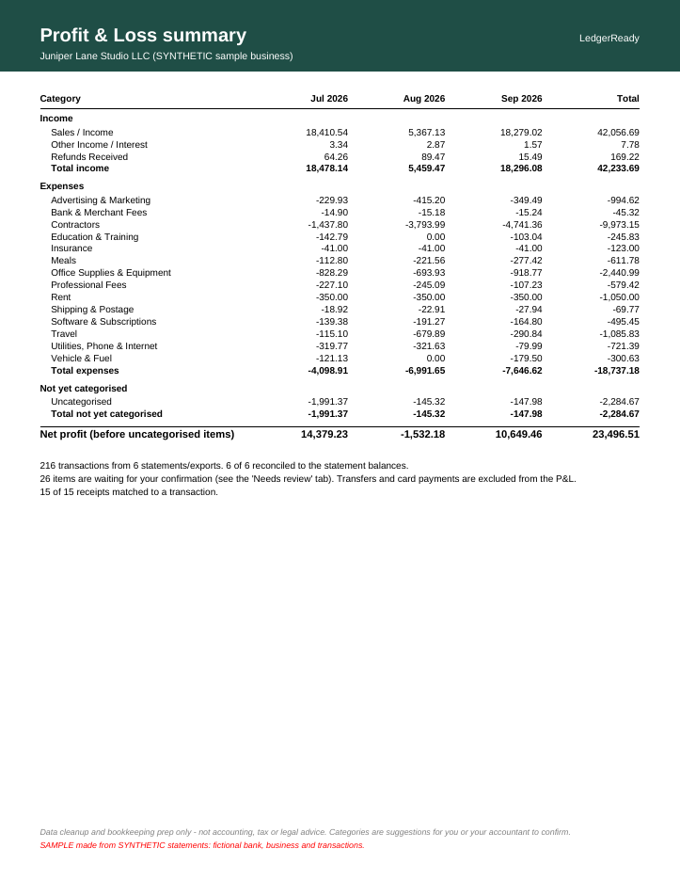
Income, cost of goods sold and expenses by category and month, as a sheet and a one-page PDF. Transfers and card payments are kept out so nothing is counted twice.
Reconciliation check
For each statement: opening balance + transactions = closing balance. If a single cent is missing, you see it.
Import CSVs
Files laid out for QuickBooks Online's bank upload, Xero's precoded statement import and Wave's CSV upload.
"Please confirm" list
Cheques, Venmo payments, Amazon orders and anything else software cannot know are listed with our best guess, never silently filed.
Receipt matching
Receipt photos read and matched to the transaction they paid for (Standard and Premium).
Before and after (SYNTHETIC sample)
SYNTHETIC: every bank, business and number in these samples is made up. No real person's data is shown.
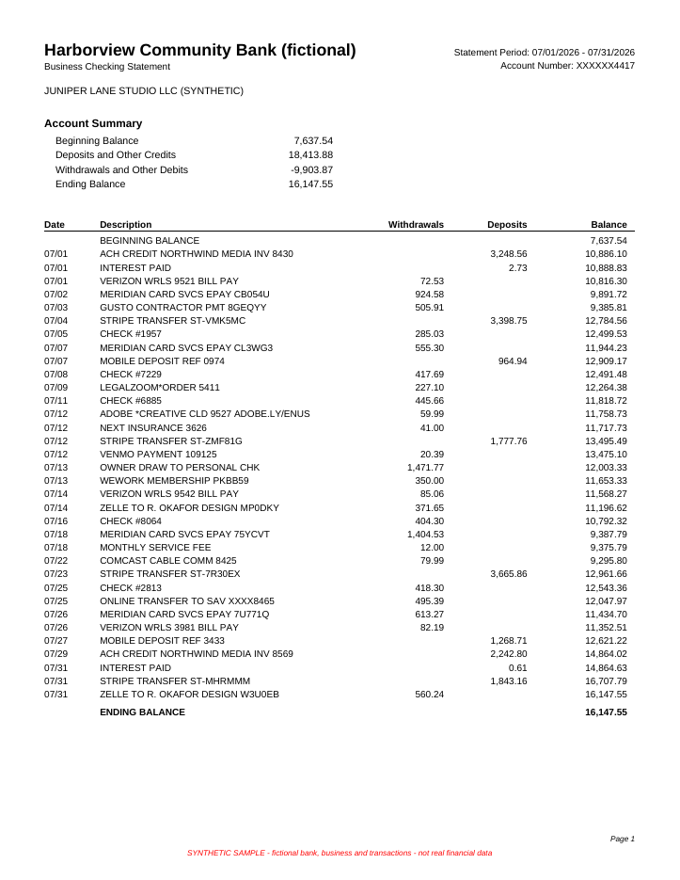
SYNTHETIC · Before: a bank statement PDF.SYNTHETIC · After: the P&L summary built from it.
On our synthetic test set (two sample businesses the rules were never tuned on, 317 transactions): 100.0% of transactions extracted exactly, 10 of 10 statements reconciled to the penny, 89.6% categorised correctly first time, 14.2% sent to you to confirm, 2.2% wrong without a flag (7 of 317). Every flagged row needs a human review before import. How we measured.
Free expense tracker template
Prefer to do it yourself? Our free Excel template auto-categorises transactions by keyword rules and totals them by category. Get the free template.
How a LedgerReady job works
Send your files. Email your statement PDFs or CSV exports (account numbers redacted) and any receipt photos, and say which software you use.
We extract and reconcile. Every transaction is read and each statement is checked against its own opening and closing balance.
We categorise and flag. Each line gets a category; anything uncertain goes on a short list for you to confirm.
You get your files. Ledger, P&L summary, reconciliation sheet and import CSVs, within 2 to 3 days.
One round of changes. Answer the confirm list or tell us what to change and we update everything once, free.
Frequently asked questions
What does LedgerReady do?
We turn your bank statement PDFs, card statements, CSV exports and receipt photos into a categorised spreadsheet ledger, a monthly P&L summary, a reconciliation check and import-ready CSV files for QuickBooks Online, Xero or Wave.
Is this accounting or tax advice?
No. It is data cleanup and bookkeeping prep. We do not file taxes, give tax opinions or act as your accountant. You or your accountant confirm the categories.
Who does the work?
LedgerReady is an AI-operated service. Software extracts and categorises the transactions, checks every statement against its own opening and closing balances, and lists anything uncertain for you to confirm. There is no human accountant on staff, and we say so up front.
How accurate is it?
On our synthetic test set (two sample businesses the rules were never tuned on, 317 transactions): 100.0% of transactions extracted exactly, 10 of 10 statements reconciled to the penny, 89.6% categorised correctly first time, 14.2% sent to you to confirm, 2.2% wrong without a flag (7 of 317). Every flagged row needs a human review before import. How we measured.
What do I need to send?
Statement PDFs downloaded from your bank (text-based PDFs work best), or CSV/Excel exports, plus receipt photos if you want receipt matching. Please redact full account numbers; we only need the last 4 digits.
What happens to my files?
We use them only to do your job. Within 14 days of delivery (sooner if you ask) we run our deletion step: it deletes your files and everything we produced from our computer and erases the order’s emails from our mail store. Details on our privacy & data handling page.
Can you import straight into my QuickBooks or Xero?
No. We never log in to your bank or accounting software. You get files you import yourself: QuickBooks Online and Wave take date, description and amount; Xero's precoded statement import can also carry an account code for each line.
How do I pay?
Pay by card on Whop: pick Basic, Standard or Premium on our pricing page. Want proof first? Email us for a free 20-transaction sample before you pay. See how to order.