Free expense tracker template
The free LedgerReady expense tracker is an Excel workbook: paste your bank transactions, and 87 editable keyword rules fill in a category for each line and total them by category. It also opens in Google Sheets. Free to download, no email needed.
Download the free template (.xlsx)
What's inside
- Transactions: Date, Description, Amount, Auto Category, Override, Category, room for 1,000 rows.
- Rules: 87 starter keyword rules (first match wins), space for 200.
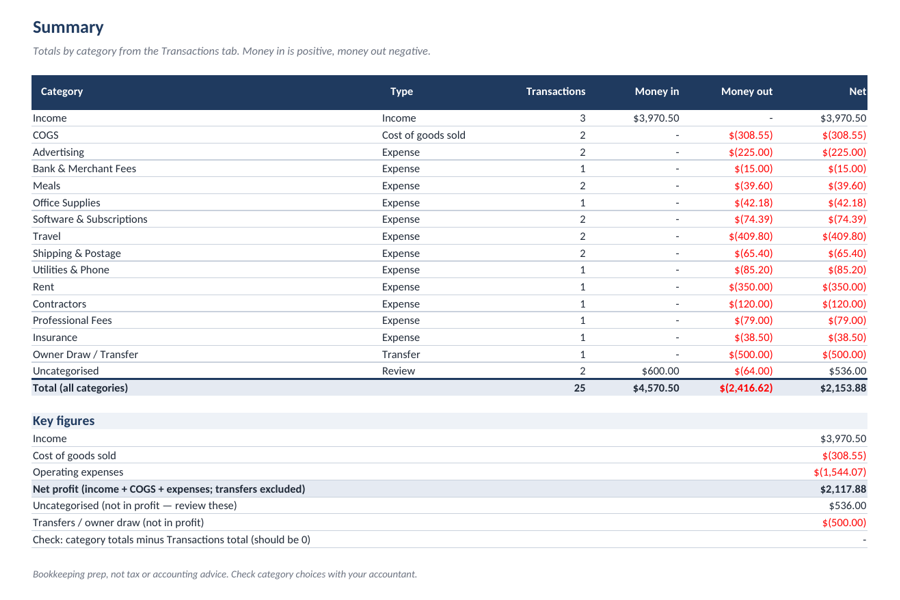
- Summary: count, money in, money out and net per category, with a check cell.
- Categories: a 16-category small-business list.
Formulas were tested by recalculating in LibreOffice (639 checks passed). It has not yet been tested by us inside Excel or Google Sheets themselves, so tell us if anything looks off.
How to use the free template
- Export from your bank. Download a CSV of your transactions from online banking.
- Paste. Paste date, description and amount into the Transactions tab, replacing the sample rows.
- Check the categories. Fix any line with the Override column; add a keyword to the Rules tab so it sticks.
- Read the Summary. Totals by category update automatically.
Last updated · What changed